
WhatsApp Coming soon
WhatsApp messages to drivers for relief, handovers, returns and an expiring licence or PrDP, and one inbox for the office to answer drivers' messages.
Every transport type, from tippers to tankers. Schedule from a live board, drivers tap Loaded and Offloaded on their phones, slips are read automatically and invoices go to Xero.
No self-service sign-up yet: we set it up with you, with your trucks, drivers and routes.
Switch on the divisions you run. Each truck and trailer keeps its own type and specs, so the app speaks your work.
What happens to a truck between one load and the next, and who does what.
The driver taps I have offloaded and photographs the offloading slip or POD. The truck shows as free.
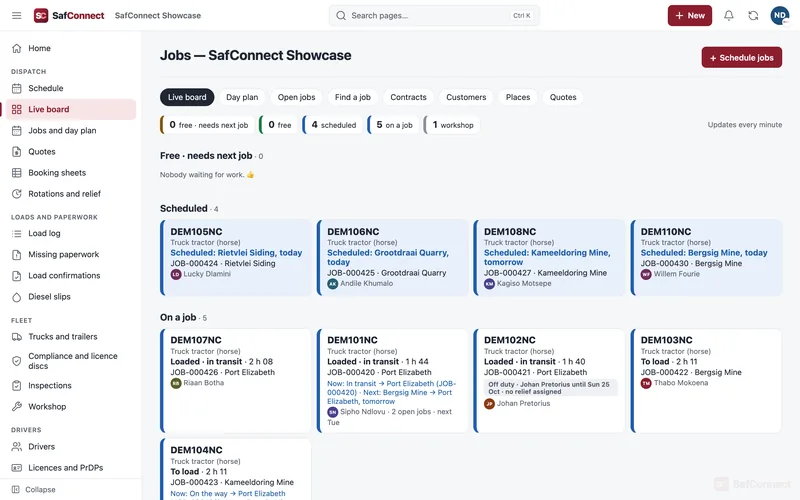
The board shows every truck: free and needing its next job, scheduled, loaded and in transit, or in the workshop.
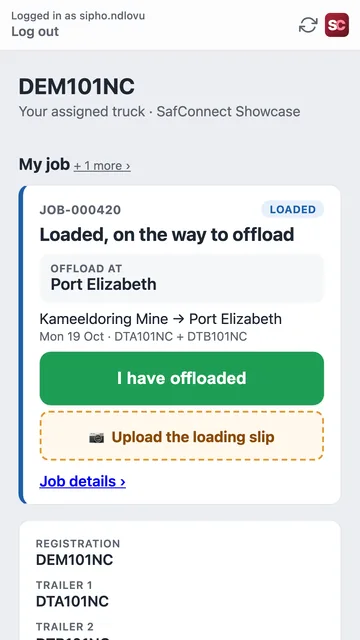
Tick the ready trucks and pick the mine or route. Each driver sees the new job in the app.
The mine's booking sheet is built from the schedule, in that mine's layout, as Excel or a PDF to print.
At the mine the driver taps I have loaded and photographs the loading slip.
Each slip is read automatically and matched to its truck, load and job. Anything unclear goes to a review list.
With its paperwork in, the load is ready to invoice into Xero, or as PDFs. Subcontractor remittances are prepared from the same loads.
Screens from the app, shown with a made-up demo company.
See every truck at a glance and give each one its next job. Schedule several trucks to a mine in one go, or queue a job behind the one a truck is on.
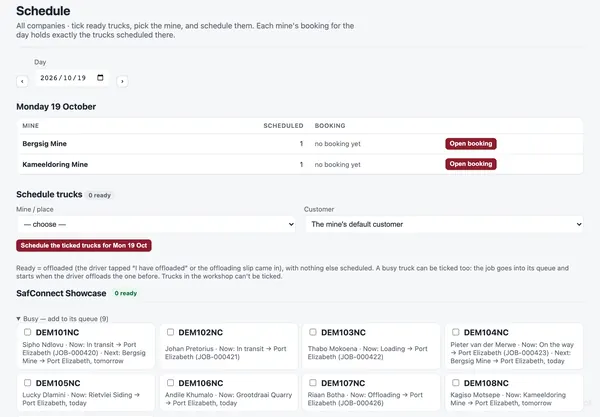
Drivers see their job (where to load, where to offload, which trailers) and tap I have loaded and I have offloaded. They photograph the slips and PODs from the same screen.
Drivers photograph loading slips, offloading slips, diesel slips and PODs. SafConnect reads the registration, tonnes, dates, ticket numbers and litres, and files each one to the right truck, load and job.
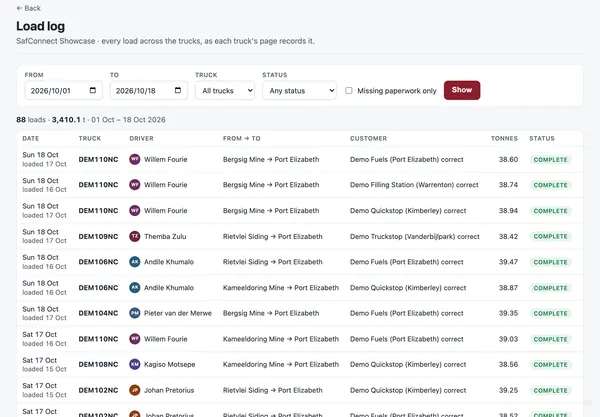
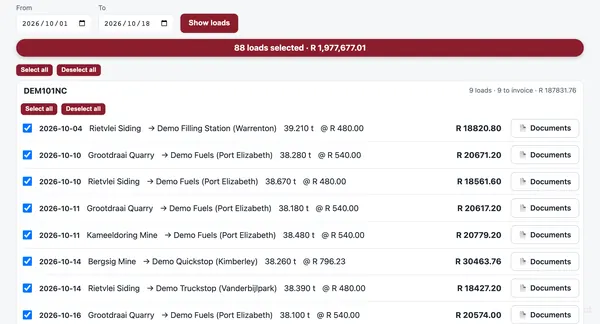
Pick a date range, tick the loads and create the invoices: one per load, or combined per customer where that's how they want to be billed. Already-invoiced loads are marked so nothing is billed twice.
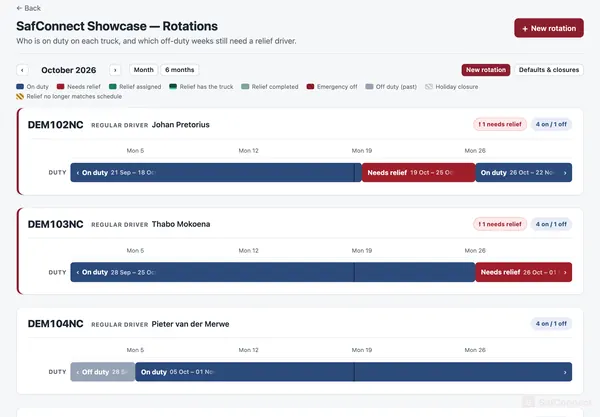
Set each truck's rotation once (say four weeks on, one off) and see who is on duty, which off-weeks still need a relief driver, and when handovers happen. Driver pay follows who actually drove.
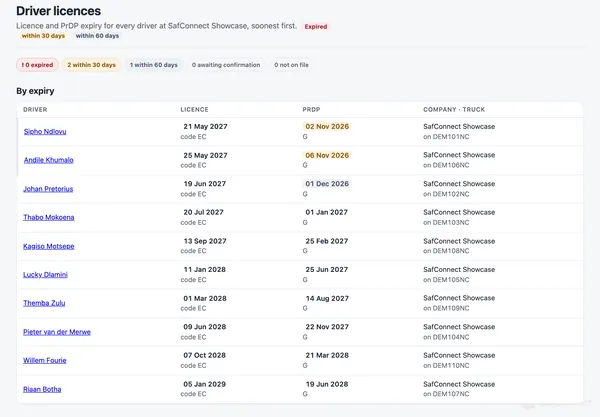
Driver's licences and PrDPs are read from their documents, and every driver's expiry dates sit on one list, soonest first, with reminders before they run out.
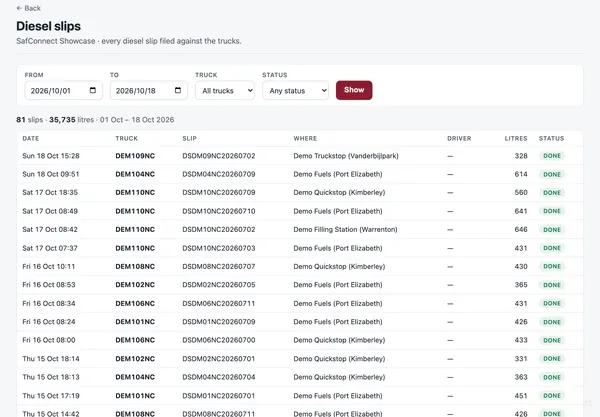
Every diesel slip is read and attached to the load it fuelled. When the supplier's invoice arrives, each line is checked against your slips by date and litres. Business expenses are captured from their invoices too.
WhatsApp messages to drivers for relief, handovers, returns and an expiring licence or PrDP, and one inbox for the office to answer drivers' messages.
Run subcontractors as their own companies. Each login sees only the companies it's allowed to, checked on the server for every page. Subcontractors get their own login and the remittances prepared for them.
Booking sheets for each mine in its own layout, quotes for new work, and load confirmations as PDFs for your customers.
SafConnect was built inside a working South African transport fleet with subcontractors, and that fleet runs on it every day.
Priced per truck, per month: the bigger the fleet, the lower the price per truck. Every package has every feature. There's no self-service sign-up or online payment yet; book a demo and we'll set it up with you.
Launch offer: 10% off the monthly price for your first 12 months when you sign up by 31 December 2026.
Annual: 25% off the monthly price, paid a year at a time.
1–5 trucks
6–20 trucks
21–50 trucks
51–100 trucks
101–250 trucks
251+ trucks
All prices per truck per month, excl. VAT. Your fleet size sets the package. The launch offer and the annual discount can't be combined.
Yes. SafConnect handles tippers, tautliners, flat decks, tankers, low-beds and abnormal loads, reefers, containers, car carriers, livestock and rigid trucks. You switch on the divisions you run, and each truck and trailer keeps its own type and specs.
No. The driver app runs in the phone's web browser. Drivers sign in, see their job, tap Loaded and Offloaded, and photograph their slips. Any smartphone with a camera works.
Xero today: invoices are created as drafts in your Xero. Sage is coming soon. You can also download invoices as PDFs with a summary CSV for any other program.
It goes to a review list with the reason, so someone in the office can check the photo. SafConnect never guesses a number it can't read.
Yes. Each subcontractor gets a login that only shows its own company: its trucks, loads and remittances.
Yes. Every login is limited to the companies it's allowed to see, and that's checked on the server for every page, not just hidden on screen.
You pay per truck per month, excl. VAT, and your fleet size sets the price per truck. Normal prices: Shuttle (1–5 trucks) R421, Convoy (6–20) R399, Fleet (21–50) R383, Corridor (51–100) R366, Network (101–250) R350 and Nationwide (251+) R332. Every package includes every feature. There's no online payment yet: book a demo and we'll set it up with you.
Monthly launch offer: sign up by 31 December 2026 and pay 10% less than the normal price for your first 12 months (for example R379 instead of R421 per truck on Shuttle). From month 13 the normal price applies.
Annual: pay a year at a time and get 25% off the normal price (for example R316 per truck per month on Shuttle, paid yearly).
You choose one or the other: the launch offer and the annual discount can't be combined. All prices are excl. VAT.
Book a demo. We'll show you the app with sample data, then set it up with your trucks, drivers, mines, routes and rates.
Tell us a bit about your fleet and we'll get back to you to book a time — or WhatsApp Alan now.